-3.png?width=171&height=30&name=%E6%AD%A3%E5%B8%B8(%E4%BA%8C%E5%80%8D%E5%9B%BE)-3.png)
Gediminas Kirdeikis
An influential YouTuber in architecture

Powerful CAD solution tailored to the needs of engineers, architects, and creators. Start your 30-day free trial and design smarter, faster with ZWCAD.

With ZWCAD's perpetual licensing, you won't have to worry about recurring subscription fees or annual price increases, giving you maximum flexibility and budget-friendly affordability.
 ZWCAD Standard
 ZWCAD Professional
 AutoCAD®
1. The prices of ZWCAD versions shown here are for stand-alone licenses, and the total prices shown in the chart include Yearly Maintenance.
2. With ZWCAD's Yearly Maintenance program, you'll receive unlimited access to industry-leading technical support and the latest major release versions and updates at an unbeatable price - starting just at $180/year for ZWCAD Standard and $280/year for ZWCAD Professional.



Transform your design process with ZWCAD exclusive features that expand design possibilities and streamline workflows. Tackle complex projects with precision and ease.

Smoothly handle large, complex point cloud data directly in ZWCAD. Users can attach, manage, and edit point clouds such as cropping and creating section plans. This feature enables users to obtain real-world context faster, reduce errors and improve design accuracy.

Import various mapping services such as Bing Maps, ArcGIS and services compliant with OGC standards. It can also match geographic markers with specified points in drawings. This feature allows easier and more accurate integration of GIS data to support better decision-making.

Converts raster images into editable CAD entities. It helps users reuse historic drawings or scanned patterns, reducing the workload and cost of converting them to CAD drawings manually.

Allows architects to quickly generate dynamic tables of selected rooms, including their areas, with just a single click. It summarizes total floor space and enables export to Excel for further calculations and edits, streamlining space management and analysis.

Streamlines the plotting process, allowing CAD designers to compile multiple sheets into a single PDF, DWF, JPG, or PNG file with one click. This feature saves time and effort, enhances productivity, and supports a hassle-free, efficient workflow.

Work with multiple drawings easily. Instead of switching between tabs or launching multiple instances of ZWCAD, you can drag a document tab out as an independent floating window and view different drawings conveniently in a multi-monitor environment.

An influential YouTuber in architecture
Start with what you have. Our migration process ensures your existing settings, workflows, and designs transfer smoothly, allowing you to maintain productivity without interruption.


Small-Business, validated G2 reviewer
ZWCAD supports seamless DWG compatibility, along with various industry-standard file formats such as IFC, DXF and DGN. It reads, writes and saves DWG drawings directly, ensuring the highest level of compatibility when exchanging data with AutoCAD® and other CAD solutions on the market.
The familiar user interface and commands allow CAD drafters, architects, designers, and engineers start creating instantly, with all necessary commands and configurations readily available.
Hundreds of trusted developer applications simplify design for AEC professionals. Notable apps like Autoturn, TcpMDT, CADprofi, Spatial Manager, and CSIxCAD, built on ZWCAD, deliver the exceptional CAD experience you expect.
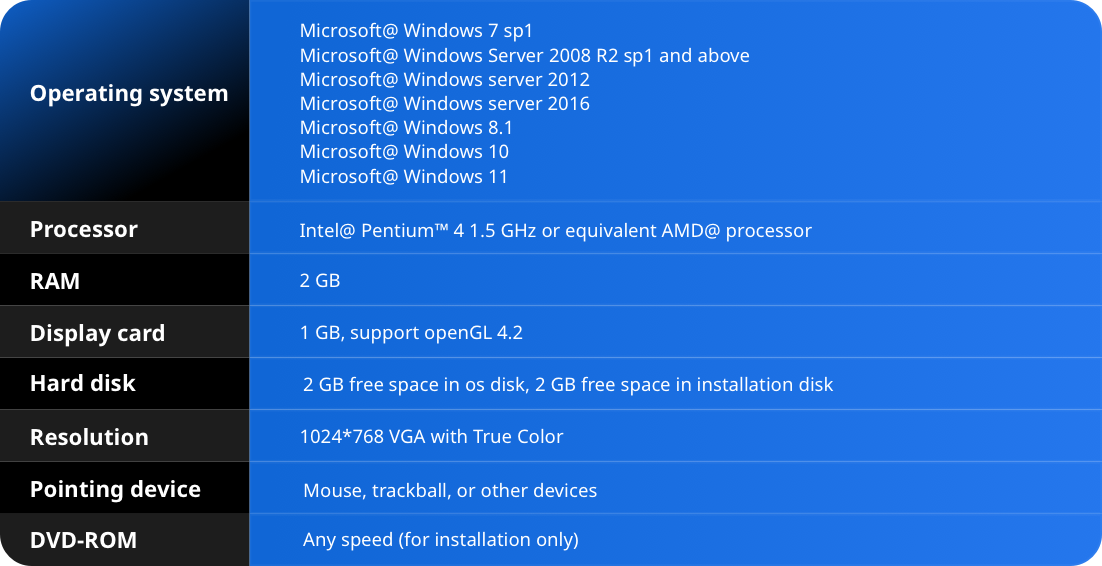
Engineered to accelerate your creative process, especially with large drawings exceeding 100MB, ZWCAD ensures you spend more time designing and less time waiting. The lower system requirements commit to a lightweight setup, running smoothly from Windows 7 to Windows 11.


A senior architect and YouTuber

A 5-year CAD user in construction, validated G2 reviewer
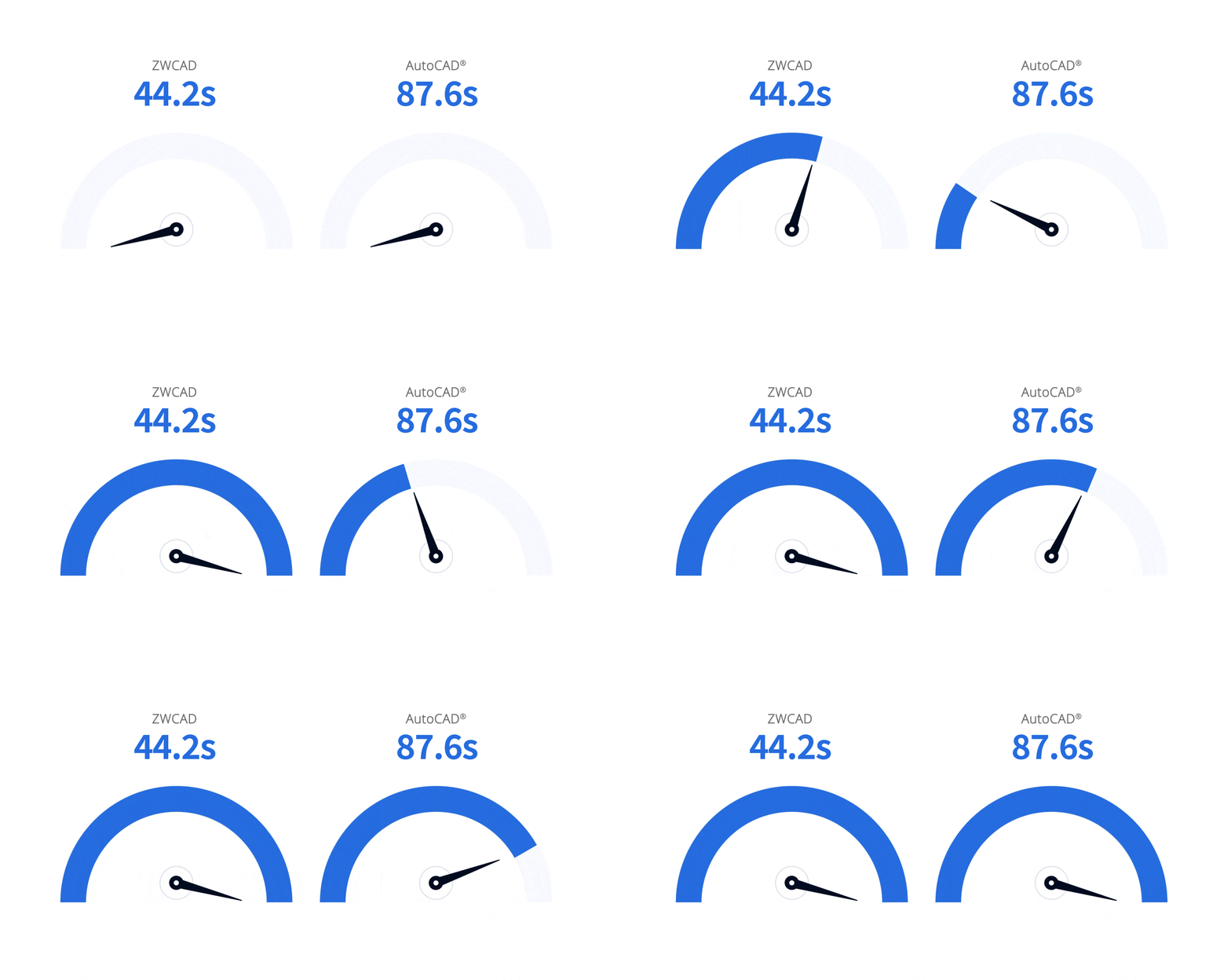
*This graph shows performance test results for 2D drafting operations (Open, Pan, Zoom, etc.) on 500+ DWG files (0.017M-1237.66M). Tests used Windows 10 64-bit, i7 CPU, NVIDIA GeForce RTX 3060 graphics card, and 32GB RAM. Note: Results may vary with different hardware/configurations. See the speed comparison in action >

Automotive

CEO of SZELTERV

Architecture & Planning
We take great pride in providing world-class support to more than one million satisfied customers. We offer a wide range of customizable support options tailored to meet your unique needs and expectations.

Product Demo

Requirement Evaluation

Onboarding & Upgrade

Product Training

Help Center

Tutorials

After-sales Support












ZWCAD is a software that has brought us many benefits because it has helped us reduce review times and costs. It has allowed us to make our work more efficient both in the office and in the field. ZWCAD has earned 100% of our trust to help us improve the country.
General Superintendent at Coconal

ZWCAD is compatible with 2D CAD formats such as DWG, DXF, making it easy for us to exchange and reuse drawings. It has a full range of professional CAD tools, and covers all our design needs.
Stamping Dies Engineer of VNAS


ZWCAD plays an important role with its stability, flexibility, scalability, and compatibility with other software. We also appreciate its very advanced features and network licensing option.
IT Director

ZWCAD is a complete and stable solution that makes our inspection and design of facilities easier than ever.
Head of Information System Dept of ADS

Discover the full potential of ZWCAD with our no-obligation, free 30-day trial.